All your household money. On your computer.

Penny brings your bank accounts, credit cards, pension and investments into one picture: where the money went, what will be left at the end of the month, and what is coming next. Free and open source. It runs on your own computer, so your data stays at home.

Bank and card sync

Live

Your accounts and cards in one list, updated every day.

  • 18 Israeli banks and card companies
  • A daily sync on a schedule, or whenever you ask
  • One-time codes from the bank, typed in the app
  • Open banking (XS2A) with an access token instead of a password
  • Bank passwords encrypted on your computer with AES‑256‑GCM

Every island is a part of Penny. Pick one, here or on the map, to see what's in it. Outlined islands are on the roadmap.

Every account, three ways in.

Sync your banks and cards automatically, connect through open banking, or bring a file. Most households mix all three, and the history comes along.

Bank and card sync Beta

Signs in to your bank's website with your own password, stored encrypted on your computer, and syncs every day. When the bank sends a one-time code, you type it in the app.

  • Hapoalim
  • Leumi
  • Discount
  • Mizrahi Tefahot
  • First International
  • Mercantile
  • Otsar Hahayal
  • Union Bank
  • Massad
  • Yahav
  • Pagi
  • One Zero
  • Isracard
  • Max
  • Visa Cal
  • American Express
  • Beyahad Bishvilha
  • Behatsdaa

Open banking

Read accounts through your bank's or an aggregator's open banking API (XS2A) with an access token, instead of a bank password. It sits in the same list as every other connection.

Excel, CSV or paste

Import the statement file from any bank or from your previous app, paste a table, or drop files into a watched folder and they import themselves. File import always works, even when a bank changes its site.

Answers to the questions every home asks.

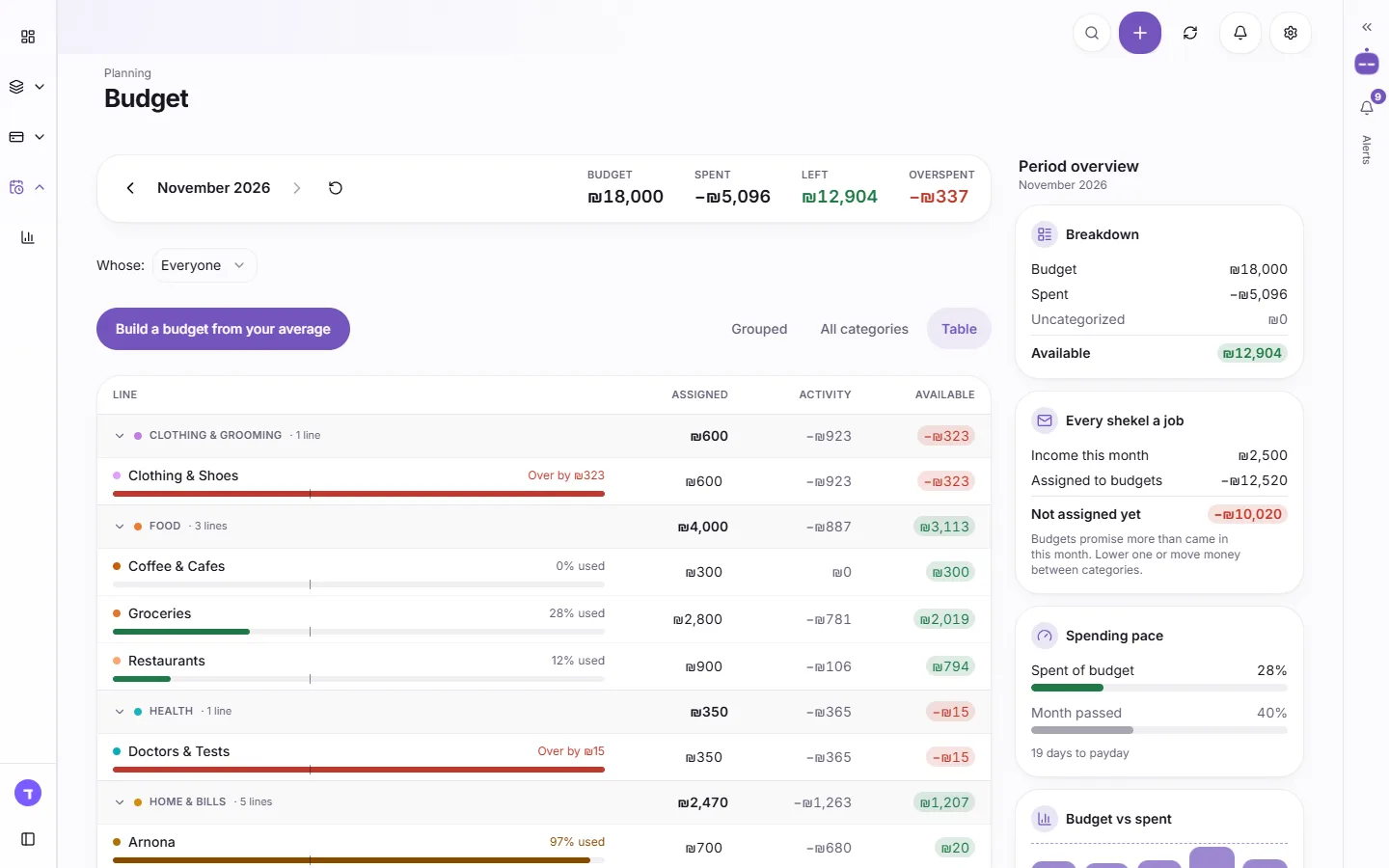
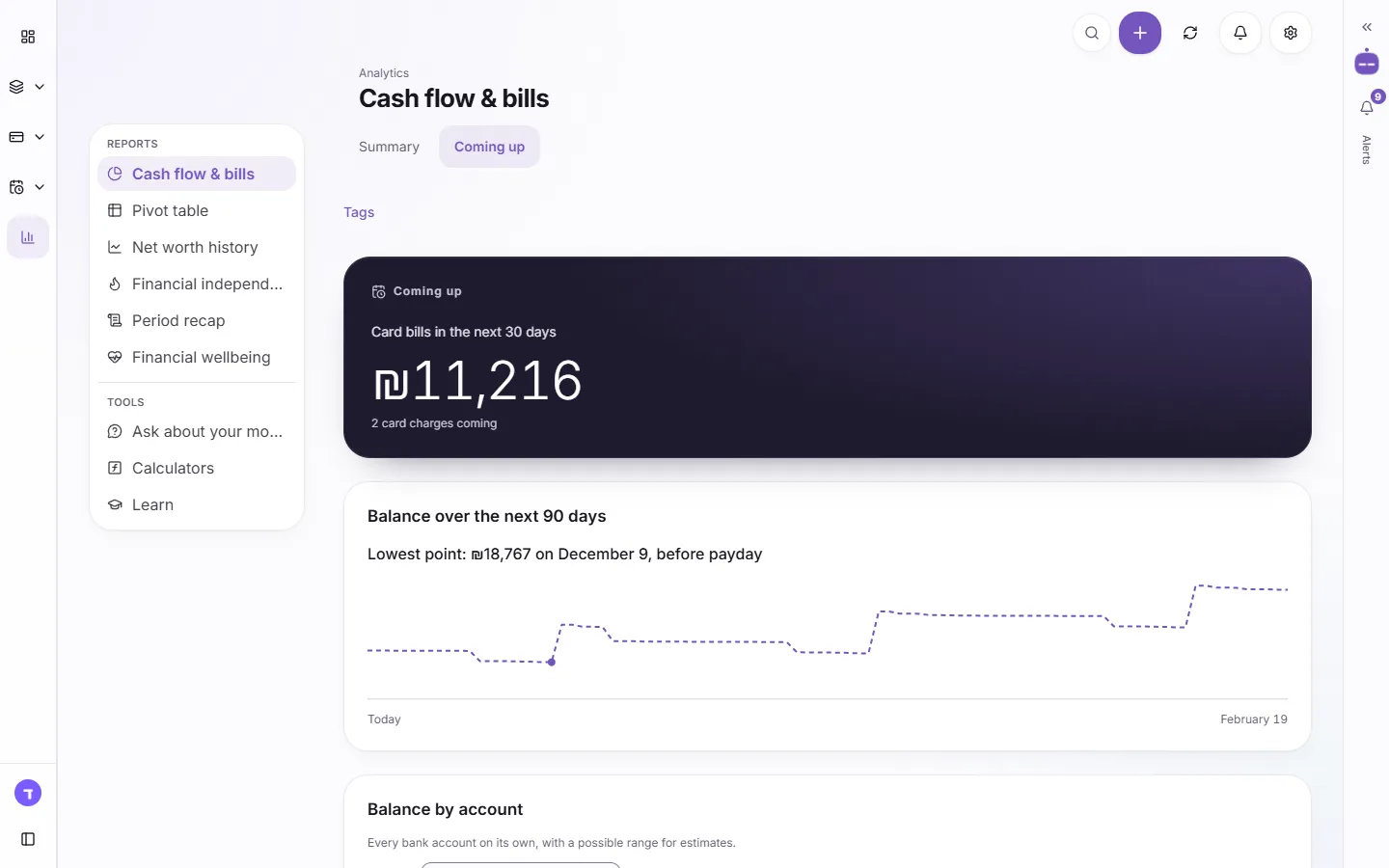
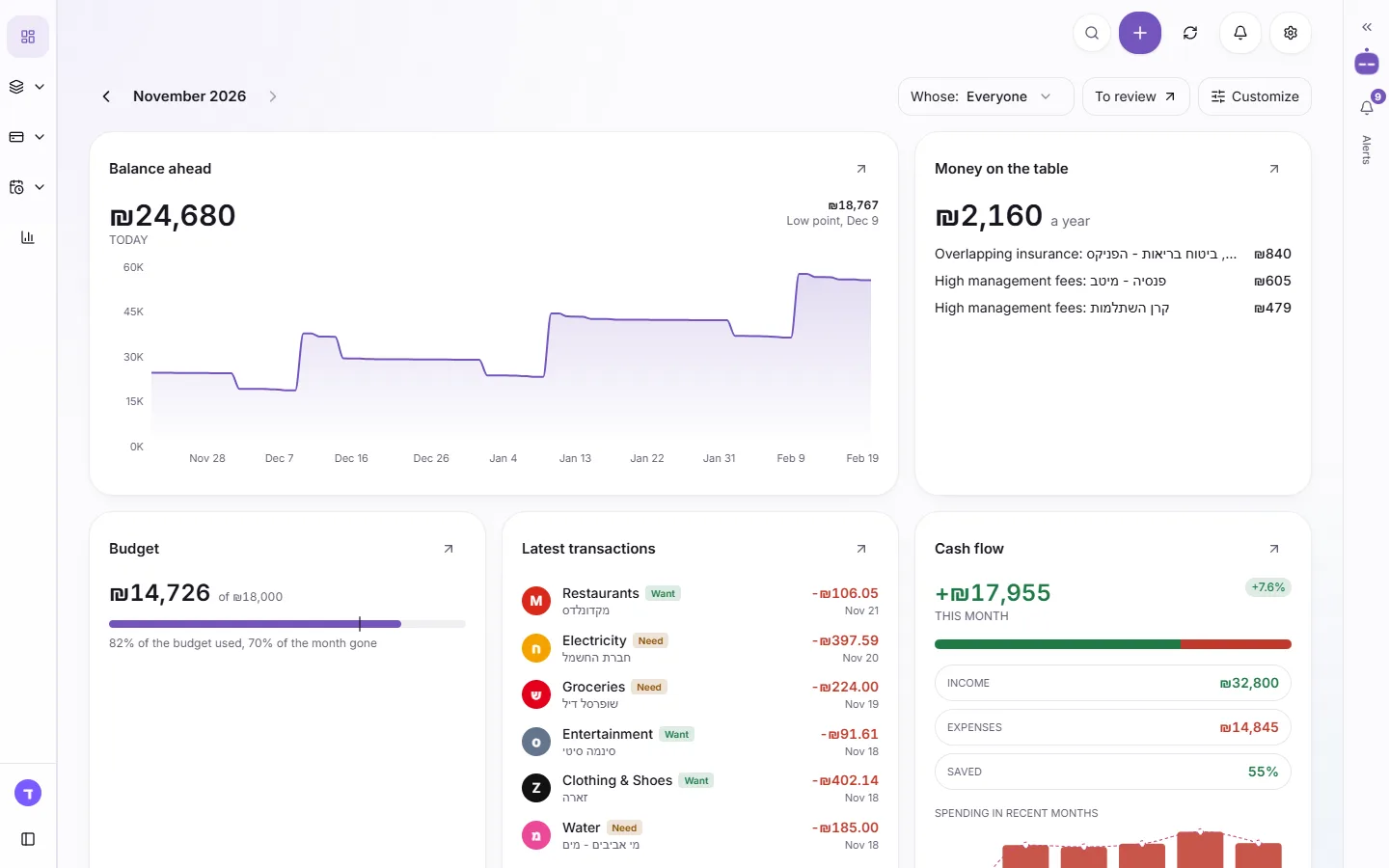
Transactions are categorized by what you taught it and a dictionary of Israeli merchants. The rest is built on top: budgets, forecasts and the places you are losing money.

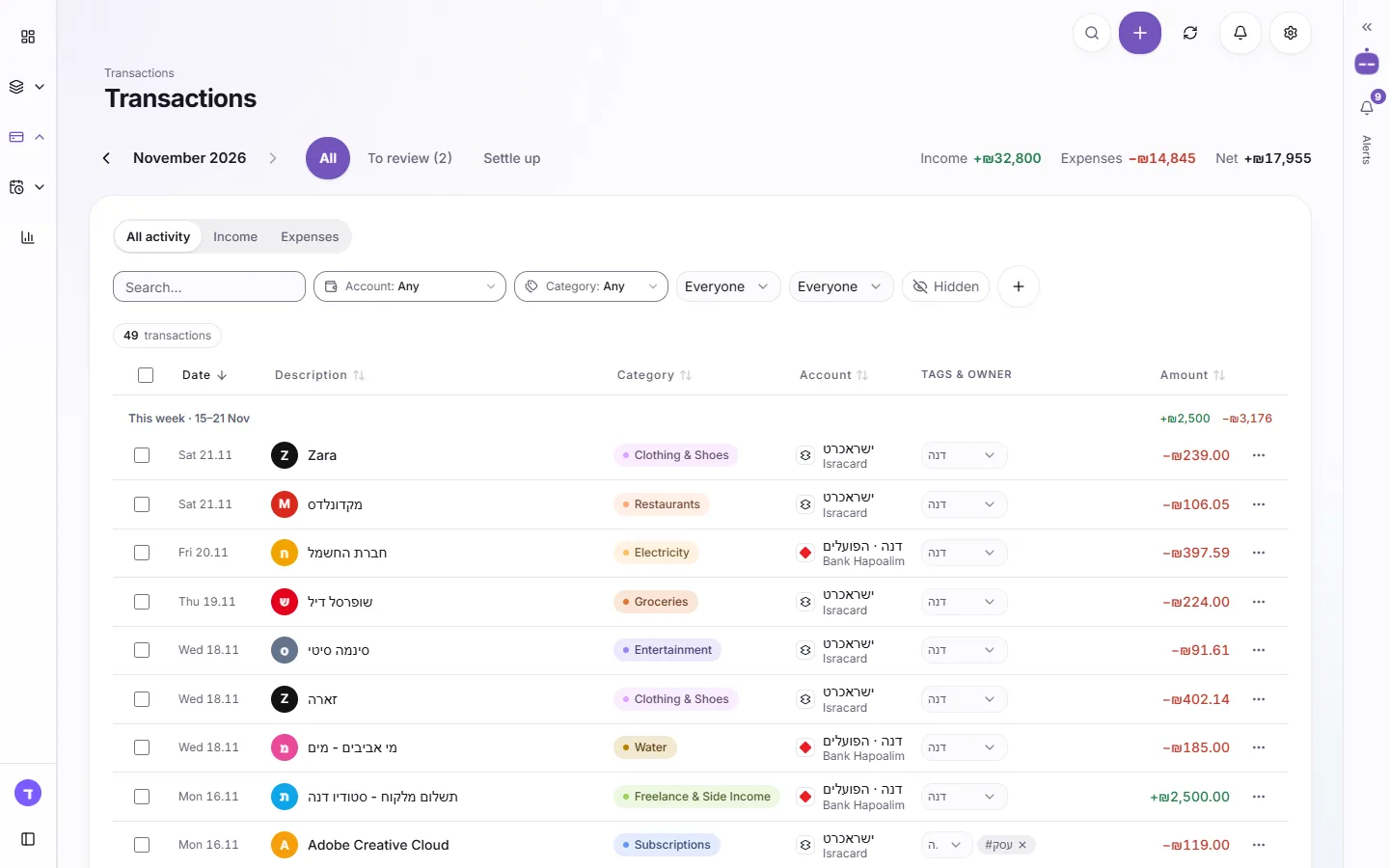
Every transaction, from every account

One list, grouped by week, in category colours, with search, splits and tags.

  • A "To review" queue for new transactions, with settle-ups kept apart
  • Automatic rules for merchants that keep coming back
  • Why spending changed against last month, by merchant: price, quantity, something new or one-off
Open this screen in the live demo
Transactions grouped by week, each with its category

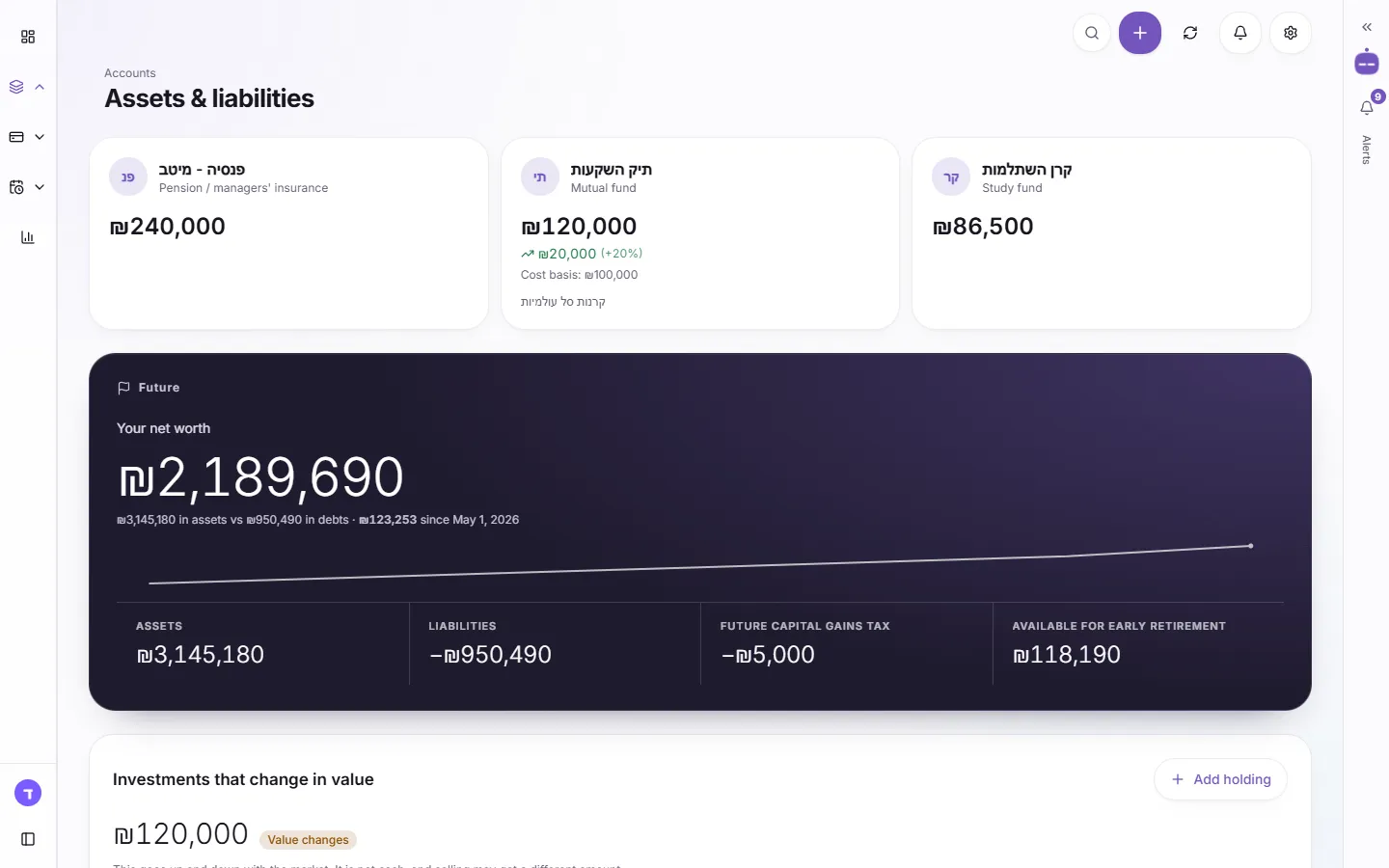
Pension and investments, next to everyday money.

Balances sync from eight pension funds and investment houses, so net worth stops being a once-a-year letter. See your management fees against the market and the whole household's net worth over time.

  • Altshuler Shaham New
  • Phoenix New
  • Excellence Trade New
  • Clal
  • Harel
  • Meitav
  • Menora
  • Migdal
  • Import your agent's report (JSON): products, fees, deposits and the insurance in it
  • Investments with buys and sells, allocation by type and currency, compared with the S&P 500 and TA-125
  • 25+ calculators for tax refunds, pension tracks, mortgage under Bank of Israel rules and financial independence
Investments and net worth

AI if you want it, on your terms.

Everything works without AI. Turn it on and it sorts the transactions your rules and the merchant dictionary don't know, and answers questions like "how much did we spend on food last month?" in plain words.

  • Local with Ollama: nothing leaves the computer, and models download from inside the app
  • MCP server so Claude, ChatGPT or any MCP client can ask about your money, read-only
  • Cloud AI costs a fraction of a shekel per sync, paid straight to the provider
  • OllamaOn your computer
  • ClaudeWith your API key
  • CLI agentsClaude Code, Codex, Gemini and more
  • No AIDictionary and your rules

Connect an AI assistant over MCP

claude mcp add penny -- node /path/to/Penny/scripts/mcp.mjs

Your money, in a Telegram chat.

Link a private bot to your own chat with a one-time code from Settings. It answers only that chat, and it talks to the Penny on your computer, not to a server of ours.

  • A summary three times a week

    Sunday, Tuesday and Thursday mornings: what's free to spend, this month's spending and the next card bills.

  • Feedback after every sync

    The biggest new expenses, each with what's left in its budget this month.

  • Reminders before charges

    Upcoming bills and subscriptions, before they hit the account.

  • Sort and add on the go

    Categorize new transactions with one tap, or forward a card-charge SMS and save it.

  • Alerts when a bank stops syncing

    When a connection starts failing, stays down, and when it's back.

  • Quiet when it should be

    Hide amounts in the chat, and the bot stays silent while the app is locked.

Pennybot, on your computer
Sunday

🗓️ Mid-month summary 🟢 ₪3,240 free until Dec 10, about ₪210 a day. This month's spending: ₪11,870 Next card bill: ₪6,412 on Dec 10

💳 New expense • ₪412 Shufersal 🟢 Food: ₪1,180 left this month

Charge of ₪86.00 at Aroma, card ending 4321

💳 Save this transaction? Aroma ₪86.00, card 4321
✓ Save✕ Ignore
🔔 Upcoming charges • Netflix, ₪55, tomorrow
💰 Status📊 Month📅 Bills🔁 Subs🏷 Sort⟳ Sync

The bot writes in Hebrew; the chat above is translated.

Your data doesn't leave home.

Penny is a program on your computer, not a service. It listens only on 127.0.0.1, blocks requests from other sites, and keeps everything in one file you can back up. Here is everything that ever goes out, and only because you turned it on.

  • Your transactions, budgets and balancesStored on your computer, in one database fileStays home
  • Bank passwordsEncrypted with AES-256-GCM, sent only to your bank's own site during a syncStays home
  • Transactions to sortTo the cloud AI you chose. With Ollama or no AI, nothing goes outIf you choose
  • Summaries and alertsTo Telegram, if you link the botIf you choose
  • Encrypted backupTo a folder your Google Drive, OneDrive, Dropbox or iCloud syncs, readable only with your passphraseIf you choose
  • Market pricesOnly the ticker or series name, to Yahoo Finance and public data sites, if you track investmentsIf you choose
  • Update checkAsks GitHub for the newest version, and can be turned offOn by default
  • App lock

    A passphrase or PIN. While it's locked, the encryption key isn't kept on disk without it.

  • Open code you can check

    Every line is on GitHub under the MIT licence, with over 1,200 automated tests and signed updates.

  • Yours to take or wipe

    Full export, automatic backup and restore, and a backup before every change to the database structure.

Runs where you want it.

A desktop app for most homes, a container for the always-on computer, and your phone on the home network.

  • Desktop app

    Installers for Windows and Mac, no terminal. On Windows it updates itself.

  • Docker

    One command on Windows, Mac or Linux. Updates back up first and roll back if the new version isn't healthy.

  • Starts with the computer

    A background service syncs every day, so the numbers are fresh when you open it.

  • Your phone, at home

    Turn on phone access behind the app lock, open it on your home network and add it to the home screen.

  • A home server or NAS

    Run it on a machine that is always on and reach it by its address, listed in PENNY_ALLOWED_HOSTS, with the lock on.

  • Away from home

    The Telegram bot is your window out: summaries, reminders and a sync on request, without opening the app to the internet.

Penny against what's available in Israel.

We checked what each product says about itself on its website or in the app store. Where we found nothing we wrote "Not stated", which doesn't mean the feature is missing. Where others do better than us, we said so. "Bank app" was checked at Hapoalim, Leumi and Pepper.

CapabilityPennyRiseUpShavveMoneytorFamilyBizCoverMyFinandaBank appExcel
Price per month₪0₪55, after a free month₪19 (Pro), after 30 free days₪49 (Premium). Manual basic: ₪0Not published. Basic: ₪0₪0No monthly plan. ₪49.90 for 3 monthsPart of the account₪0 or part of Office
Price per year₪0No yearly plan published. 12 months: ₪660₪199 (Pro)₪490 (Premium)₪349.90 (Premium)₪0No yearly plan published. 2 × ₪89.90 per half year: ₪179.80Part of the account₪0 or part of Office
All banks and cards in one placeYes 18 institutions, in betaYesYesYes in PremiumYesNot mentionedYes 15 institutionsNo only that bankManual
How it connects to the bankYour bank password, encrypted on your computer. Or a fileLicensed open banking, no passwordLicensed open banking, no passwordLicensed open banking, no passwordLicensed open banking, no passwordPension clearing house and Ministry of FinanceLicensed open banking, read onlyBuilt inTyping or copying
Where your data livesOn your computerWith the companyWith the companyWith the companyWith the companyWith the companyWith the companyWith the bankIn your file
Licensed as a financial information serviceNo software you run, not a serviceYesYesYesYesNot statedYesSupervised by the Bank of Israel—
Budget and cash flowYes budgets, envelopes, balance forecastYes monthly cash flowYes budgetsYes monthly cash flowYes spending and income targetsNot statedYes budget targetsIn some banksManual
Pension and insuranceYes pension and investments from 8 providers, insurance listNot statedYes in paid packagesPension yes, insurance not statedYesYesSavings and investments. Pension not statedAt that bank onlyManual
Where you could saveYes fees, double insurance, bank fees, tax refundNot statedYes fee comparison and paid servicesYes pension feesYes product comparison and cheaper insuranceYes pension and insurance recommendationsNot statedNot statedNo
Partner and familyYes a profile eachYes partner freeYes shared householdYes family subscriptionYesNot statedNot statedJoint accountShared file
A person to talk toNoYes cash-flow experts, on WhatsAppReferral to paid expertsNot statedInsurance and pension through a licensed agencyAn AI agent, also on WhatsAppNot statedA bankerNo
AIYes your choice, local tooNot statedYes connect your own AIYes API and MCP in PremiumNot statedYes AI agentNot stated"Smart analysis" at HapoalimNo
Phone appNo web on your home network, plus shortcutsYes iOS, Android and webYes iOS, AndroidYes iOS and webYes iOS, AndroidYes app and WhatsAppYes iOSYesYes
Works with the computer offNoYesYesYesYesYesYesYesYes
Open sourceYesNoNoNoNoNoNoNoNo

Checked on 22 November 2026. Prices and features change, so check the sites themselves. Sources: RiseUp, RiseUp FAQ, Shavve, Moneytor, FamilyBiz, Cover, MyFinanda, Hapoalim, Leumi, Pepper. Found a mistake? Tell us and we'll fix it.

When to choose Penny

You want the whole picture, including pension, insurance, tax and a forecast, with no subscription and without your data sitting with a company. You have a computer at home and don't mind a few minutes of setup.

When to choose something else

You want your bank connected through licensed open banking, without handing over a password, and a store app that works when your computer is off. RiseUp, Shavve, Moneytor, FamilyBiz and MyFinanda do that. For a person to guide you, look at RiseUp; to just see pension and insurance for free, look at Cover.

What isn't good enough yet.

So you can decide on the facts.

  • Bank sync is in beta

    It signs in to the bank's website with your password, and can break when a bank changes its site until it's fixed. File import always works. Automatic retrieval from a bank's website may break its terms of use.

  • No app in the store

    On your phone you open Penny over your home network and can add it to the home screen. There is no access from outside the home, on purpose.

  • The computer has to be on

    Sync runs while the computer is on. You set up the backup, to a folder your own cloud syncs.

  • The installers aren't signed

    Windows and Mac show a warning on first install. Updates themselves are signed and checked before they install.

Install it tonight.

The first time, a short onboarding walks you through it: a profile, a bank or a file, a monthly target and budgets.

Windows 10 and 11

  1. Download Penny-Setup-0.5.0.exe and run it. No terminal, no Node.js.
  2. If SmartScreen warns about an unsigned app: More info, then Run anyway.
  3. Bank sync uses the Chrome or Edge you already have.

Updating

Penny downloads the update itself and asks to restart. Your data stays.

Download for Windows

A personal tool for your own accounts only. Automated access to banks may violate their terms of service. Calculators give estimates, not advice.

What everyone asks before installing.

Is it safe to give the app my bank password?

The password stays on your computer only, encrypted with AES-256-GCM, and is sent only to your bank's own site during a sync. There is no Penny server it passes through. You can also turn on an app lock, and then the encryption key itself isn't stored on disk without your passphrase. The code is open, so anyone can check what it does.

Where does my data go?

Nowhere. The app runs on your computer, listens only on 127.0.0.1, and blocks requests from other sites. Data leaves only if you choose: to a cloud AI provider if you pick one (or none at all, with Ollama or no AI), and to Telegram if you connect a bot.

What if my computer dies?

Set up the automatic encrypted backup to a folder Google Drive, OneDrive, Dropbox or iCloud syncs. The file opens only with your backup passphrase, and a restore brings everything back, including access to your accounts.

How much does it cost?

Nothing. Penny is open source under the MIT license: no subscription, no ads and no paid tier. Cloud AI, if you choose it, costs a fraction of a shekel per sync, paid directly to the provider.

Does it work with my bank?

Automatic sync works with 18 Israeli banks and card companies, plus open banking. Pension and investment balances sync from Altshuler Shaham, Phoenix, Excellence Trade, Clal, Harel, Meitav, Menora and Migdal. Anything else comes in from a CSV or Excel file, or by pasting a table.

What does the Telegram bot do?

It sends a summary on Sunday, Tuesday and Thursday mornings, tells you about new expenses after each sync with what's left in their budget, reminds you before charges and warns when a bank stops syncing. You can ask for a snapshot, sort transactions, save a forwarded card-charge SMS or start a sync. It answers only your own chat.

Is this allowed?

Scraping a bank's website may break the bank's terms of service. Penny is for personal use with your own accounts, on your own computer. Don't run it as a service for others.

Is there a phone app?

Not in the app stores, but you can open Penny from your phone on your home network (turned on explicitly, behind the app lock) and install it to the home screen. Away from home, the Telegram bot keeps you up to date.

Do I need to be technical?

No. On Windows and Mac you download an installer and run it, no terminal. On Windows the app also updates itself.

See it with a sample household first.

The live demo is the full app with a year of made-up transactions, budgets, pension and goals. No signup, and nothing reaches a bank, an AI provider or Telegram.