Skip to content

Core concepts ​

Every result has a path back to the report that produced it. Explore that path first; the technical definitions are below.

FOLLOW THE EVIDENCE

A run is a story you can verify.

Select a step to see what it means in the product.

ILLUSTRATIVE EXAMPLE / 01Checkout regression
01Browser tests
02Timeout · 5 minutes
03Required capability · browser
The job describes the work to be done.
01 / 06

Work is requested

A job records what should run, its deadline and the capabilities it needs.
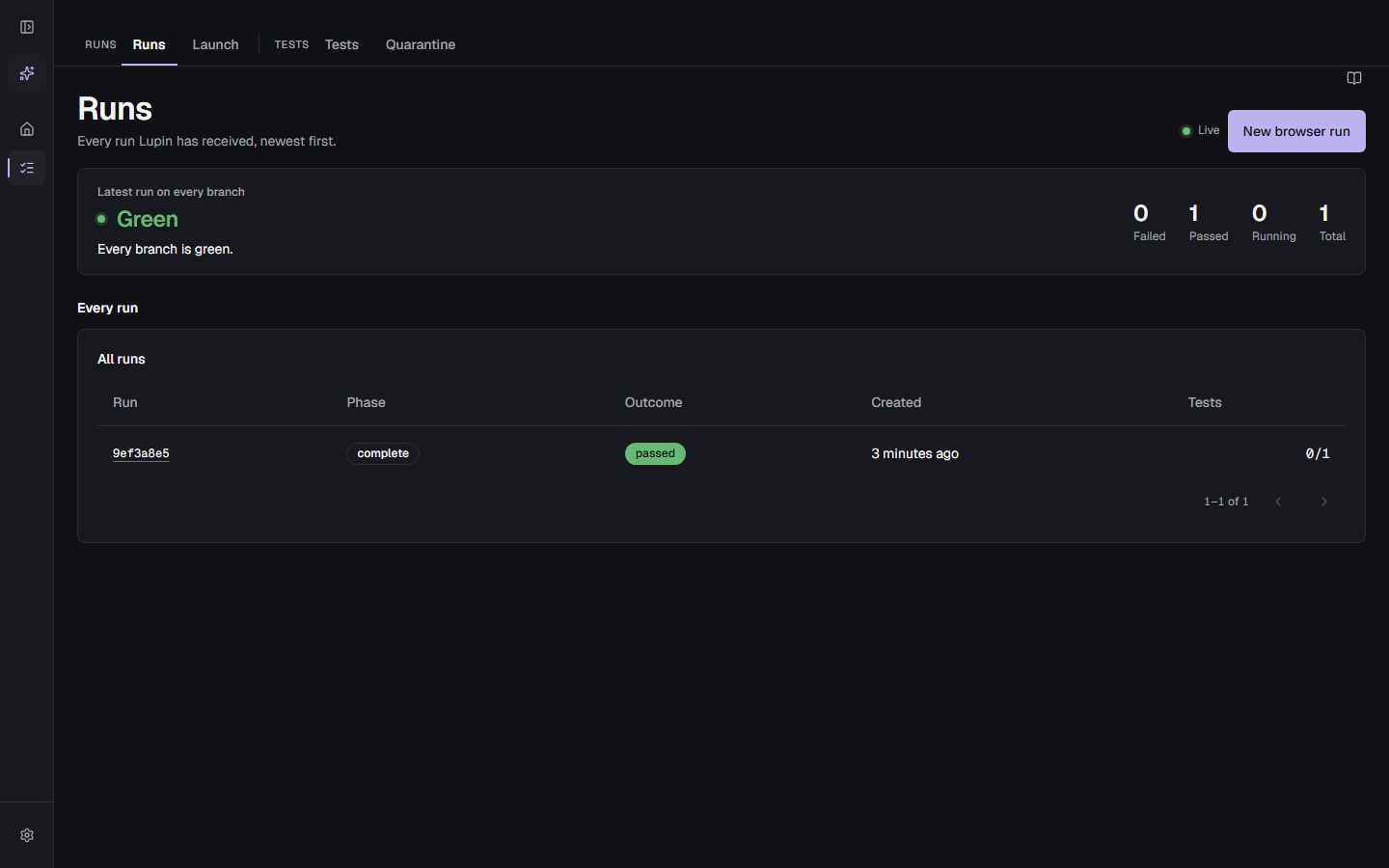
Lupin runs screen with outcome badges, recent executions and release readiness shown together
CLICK A NUMBER TO EXPLORE
Outcomes

Read the outcome of each run here. A failed run remains visible beside the runs that passed.

The chain ​

A run has six links. Each one answers a different question about what happened and where the evidence came from.

See the technical definitions
LinkWhat it is
JobA unit of work in the execution_jobs queue, with a timeout, required capabilities and labels.
LeaseA runner's claim on a job. It carries a fencing token, so a runner that lost its lease cannot complete the job.
AttemptOne execution of the job. A lost lease requeues it as the next attempt, up to the run's maxAttempts.
Normalized resultThe producer's report, parsed by one adapter into a CanonicalRunResult: tests, statuses, retries, durations.
ArtifactThe raw report and any declared files, stored as objects.
DigestA SHA-256 over exactly the bytes that arrived, so two uploads of one report are recognised as one.

The dashboard shows which links a run has. A run with a result but no artifact is a different, weaker claim than one with both, and the console says so instead of rounding up.

Runs and their phase ​

WHERE IS THE RUN?Collecting evidence
Run ✓Collect →Evaluate

The execution is still gathering reports and artifacts.

WHAT HAPPENED TO THE TESTS?Tests failed
× Failure recorded

A failure can already be known while collection continues.

Both can be true at the same time. Phase describes progress; outcome describes the result.

All run phases and terminal states

A run moves through phases — queued, assigned, preparing, running, collecting, normalizing, analyzing, gate_evaluation — and ends in one terminal phase: complete, or a named reason it did not, such as cancelled, timed_out, runner_lost, infra_failed or config_failed. Separately it has an outcome (passed, failed, partial, unknown, …). Phase answers "where is it?"; outcome answers "what happened?". Keeping them apart is what lets the console show a run that is still collecting evidence after its tests failed, and what keeps "the runner died" from being reported as "the tests failed".

Test statuses ​

The full attempt history explains the status. Try the same test with different outcomes:

TRY A SCENARIO

What if the retry passes?

Choose an example. Watch how the attempt history determines the test status.

ATTEMPT 1Failed
ATTEMPT 2Passed
REPORTED TEST STATUSFlaky

The first attempt failed and the retry passed. Lupin preserves both attempts and reports the test as flaky.

Illustrative test retries within one run. A job execution attempt is a separate concept.

All test statuses and their meanings
StatusMeaning
passedPassed on its first attempt.
failedFailed on its final attempt.
flakyFailed at least once and then passed on a retry within the same run.
skippedDeclared and not executed.
blockedCould not run because something it depends on failed.
timed_outStopped by its deadline.
cancelledStopped because the run was cancelled.
unknownThe report did not say, or could not be read. Never counted as a pass.

queued and running are the two live states before one of these.

A JUnit suite retried by Surefire, or a Playwright test with retries, is reported as flaky rather than as a clean pass — the retry is part of the evidence.

Producers and adapters ​

A producer is whatever wrote the report: Playwright, a JUnit-compatible runner, k6, or OWASP ZAP. An adapter in packages/reporter reads one producer's format into the canonical model. There is one adapter per format and one ingestion path, so the same report always produces the same result, whichever route delivered it.

Workspaces ​

Every run, job and event belongs to a workspace (WORKSPACE_ID). A self-hosted install uses one workspace by default. Which tables carry the boundary is recorded in docs/quality/tenancy-scope.json, and pnpm tenancy:check keeps that record honest.

Next ​